Pascal's Blog
Designing a Chaos Engineering CLI from First Principles
Designing a Chaos Engineering CLI from First Principles
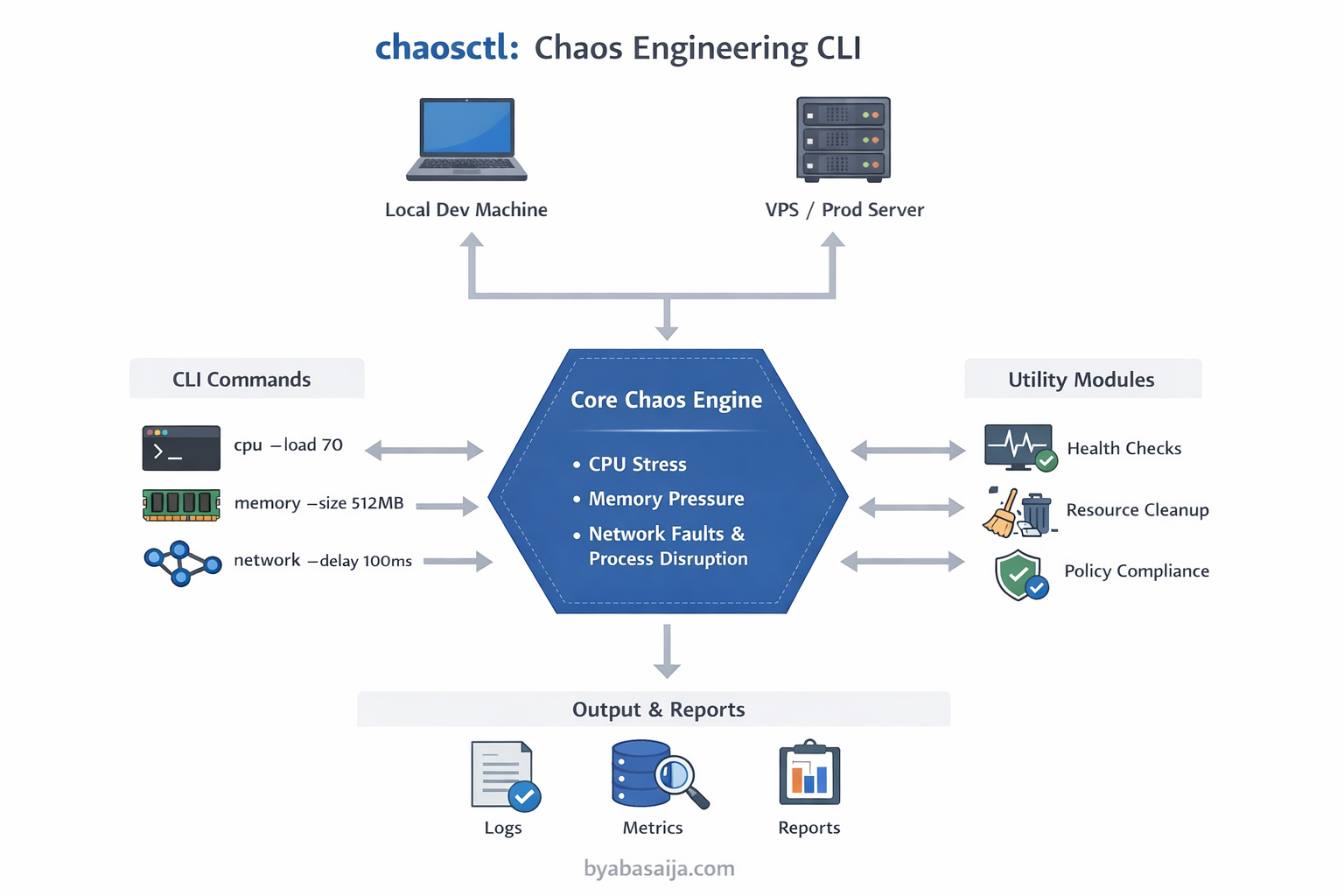
Note: This is a pre-implementation design document — the architectural plan guiding how chaosctl will be built. Writing the design first is a deliberate choice: it forces clarity of thought, surfaces trade-offs early, and creates a reference point to compare against once the tool is actually built. A follow-up post will cover how the implementation diverged from this plan and why.
Introduction
Chaos engineering is the practice of intentionally introducing controlled failures into systems to uncover weaknesses and improve resilience before users are affected. Netflix pioneered this with the Simian Army, a suite of specialized tools like Chaos Monkey, Chaos Gorilla, Doctor Monkey, Janitor Monkey, and Conformity Monkey. Each tool addresses a specific scenario within Netflix's cloud ecosystem, often tightly coupled with Spinnaker and AWS.
Inspired by these ideas, chaosctl aims to combine the best practices of chaos engineering into a single, simple, and application-agnostic CLI. Unlike Netflix's tools, chaosctl is designed to work with any developer's service, whether running locally, on a VPS, or in a staging/production-like environment.
Why Not Existing Tools?
Several mature chaos engineering tools already exist. So why build another one?
| Tool | Problem for individual developers |
|---|---|
| Chaos Mesh | Kubernetes-only. Requires a running cluster — overkill for local or VPS-based services |
| Litmus | Also Kubernetes-native, with heavy YAML configuration and operator overhead |
| Gremlin | Commercial SaaS product. Not free for solo developers or small teams |
stress-ng | Low-level Linux utility, not chaos-aware. No CLI abstraction, no experiment lifecycle management |
| Netflix Simian Army | Deeply coupled to AWS and Spinnaker. Not portable outside Netflix's infrastructure |
The gap is clear: there is no simple, self-contained CLI that a developer can go install and immediately run chaos experiments on any service, anywhere. chaosctl is designed to fill that gap.
Goals and Requirements
The goals for chaosctl focus on usability, universality, and extensibility:
Unified Chaos Tool
- Combine multiple chaos experiments in one CLI instead of separate tools
- Support CPU stress, memory pressure, disk I/O saturation, network faults, and process disruptions
Application-Agnostic
- Not tied to any specific orchestration system or platform
- Developers can use it on any service regardless of language or framework
Flexible Deployment
- Can run locally for development, on a VPS for staging, or in controlled production-like environments
Simplicity and Usability
- CLI commands should be intuitive with clear flags, optional configuration files, and minimal setup
- Users should be able to quickly execute experiments without reading extensive documentation
Extensible and Modular
- Add new chaos scenarios as separate modules
- Maintain clear separation between command parsing, chaos engine, and utility modules
Safety and Monitoring
- Optional confirmation prompts for destructive experiments
- Basic health checks, logging, and resource cleanup inspired by Janitor Monkey, Doctor Monkey, and Conformity Monkey
Why Go?
The choice of Go for chaosctl is deliberate, not incidental:
- Single binary distribution —
go buildproduces a self-contained executable with no runtime dependencies. Users can download one binary and start experimenting immediately - Native concurrency — chaos experiments often need to run multiple stressors simultaneously (CPU + network + memory). Go's goroutines and channels make this straightforward
- Cross-platform by default — Go compiles natively for Linux, macOS, and Windows without platform-specific build tooling
- Strong standard library —
os/exec,syscall, andcontextpackages provide everything needed for process management, signal handling, and timeout control without third-party dependencies - Fast startup time — unlike JVM or Python-based tools, a Go CLI starts instantly, which matters for short-lived chaos experiments
- Cobra — the de facto CLI framework for Go (used by Kubernetes, Hugo, and GitHub CLI) gives chaosctl a familiar, well-structured command interface out of the box
High-Level System Components
The system follows a clean architecture with clear separation of concerns:
chaosctl/
├── cmd/                  # CLI commands & subcommands (primary adapters)
├── pkg/                  # Core chaos logic (engine/domain)
│   ├── cpu/              # CPU stress logic
│   ├── memory/           # Memory stress logic
│   ├── network/          # Network delay/loss/jitter
│   ├── process/          # Process termination/fault injection
├── internal/             # Internal helpers (config parsing, validation, logging)
├── main.go               # CLI entry point
├── go.mod                # Module manifest
└── README.md             # Project overview
Component Explanation
- cmd/ → CLI commands; responsible for parsing arguments and invoking the core engine
- pkg/ → core chaos logic, fully isolated from CLI to allow independent testing and reuse
- internal/ → utility modules: config, validation, logging, monitoring helpers
Data Flow
The system follows a clear data flow pattern:
-
User executes a command:
chaosctl cpu --duration 30s --load 70 -
Command Parser (
cmd/cpu.go) interprets the flags and invokes the corresponding core function -
Core Engine (
pkg/cpu/) applies CPU stress without knowing CLI details -
Utility Modules (
internal/) handle logging, configuration, and optional cleanup (Janitor Monkey style) -
Results are displayed to the user, optionally stored for future analysis
User CLI input → cmd/ → pkg/chaos engine → internal utils → output
Design Considerations
Modularity
Each chaos scenario is isolated in its own package. Adding a new experiment does not affect existing functionality.
Decoupled CLI and Core Logic
Core chaos functions can be invoked from other interfaces (scripts, web dashboards) without dependency on Cobra or CLI specifics.
Extensible Safety and Monitoring
Inspired by Doctor Monkey and Janitor Monkey, optional health checks and cleanup modules ensure experiments are controlled and recoverable.
Cross-Platform Flexibility
CLI, core engine, and utilities are written in Go for native execution on Linux, macOS, and Windows.
Unified, Simple Philosophy
The tool emphasizes simplicity for developers while still providing powerful chaos testing capabilities — a single CLI to experiment with multiple failure modes.
Conclusion
This design document lays out the architecture for chaosctl — a unified, simple, and application-agnostic chaos engineering CLI. It draws inspiration from Netflix's Simian Army but simplified: one tool that works anywhere, with minimal setup, for any developer.
The key design decisions are:
- Go for portability and single-binary distribution
- Clean separation of CLI (
cmd/), core engine (pkg/), and utilities (internal/) for testability and extensibility - Application-agnostic design to fill the gap left by Kubernetes-native and cloud-vendor-specific tools
The next step is building it — and the most interesting part will be seeing which of these design decisions survive contact with the actual implementation.